For CPAs and tax attorneys
TrackedPR is not a product you buy, log into, or administer. It is something your Act 60 clients use, and the reason to know it exists is that it changes what they bring you.
The problem is not the count
Most Act 60 clients can tell you roughly how many days they spent on the island. What they usually cannot do is show you, day by day, with anything behind it — which is the part that matters if the question is ever asked in earnest.
The reconstruction happens at filing, from calendars and boarding passes and memory, months after the fact. It absorbs your time, it is the least reliable part of the file, and it is entirely avoidable.
Why recommend it
What arrives changes
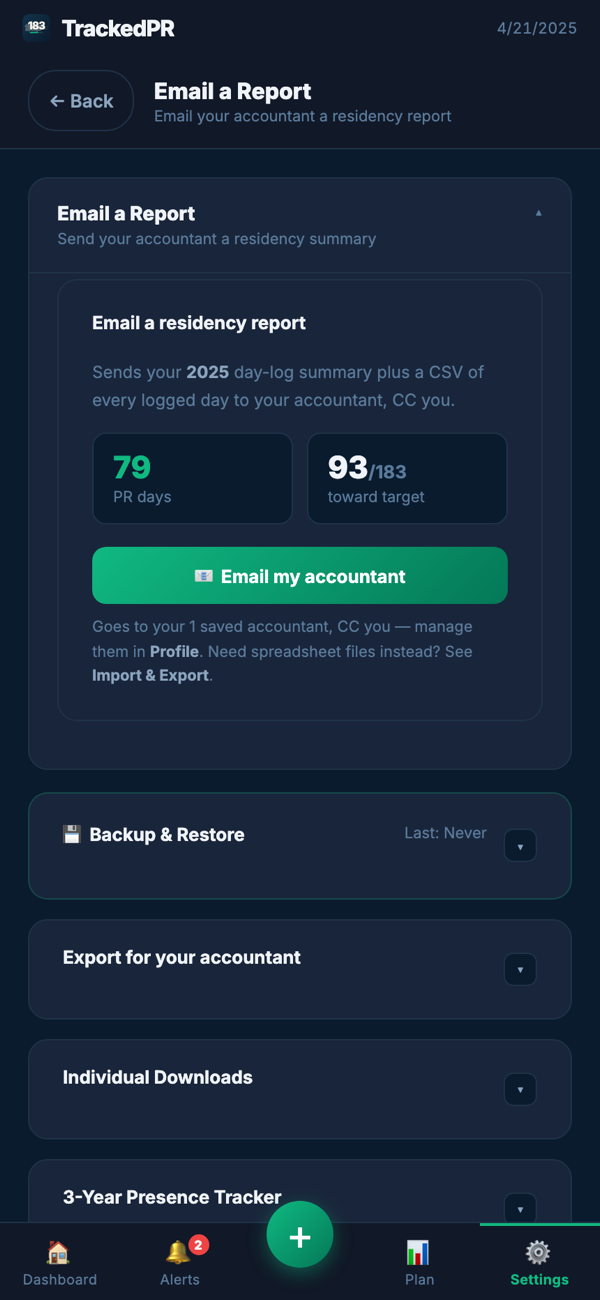
One packet instead of a shoebox.
A row per logged day — country, state, city and the time it was detected — with the proof attached to those days, the closer-connection file and the summaries.
Contemporaneous, not reconstructed
Written during the year, not after it.
Your client stops arriving with a memory exercise assembled from calendars and boarding passes in April.
You take on nothing
No login, no roster, no client data on our side.
Their records stay on their device and reach you when they send them. Recommending it creates no custody relationship for your practice.
It organises; it does not opine
It counts and files. It does not decide.
It will not tell your client whether they qualify, or hand them a position that lands on your desk contradicting yours.
The parts clients miss on their own
Counting alone, these are what gets dropped.
What actually arrives
Not a CSV dump. The full export is a folder structure, organised the way a reviewer moves through a year rather than the way an app stores it:
- Summary — the report as a spreadsheet with two tabs, a JSON backup, and the three-year tracker.
- Proof files — the documents your client attached, named by the date they belong to.
- Puerto Rico, United States, International — presence days with their proof references, by month, and within a month by state or by country.
- Sick days and hurricane or disaster days — kept in their own folders with their own proof rather than mixed into ordinary presence.
- Student documents and the multi-year presence summary, for the cases where those apply.
- Closer connection — the evidence checklist exported with its references, by category.
The spreadsheet has two tabs on purpose. One is a row per location touch, which is the one to filter and pivot. The other is a row per calendar date, which is the one to read. Columns carry the date and weekday, country, state and city, the time of detection, whether the day counts toward 183, whether it was a double-touch day, and flags for sick, disaster, student and international days as well as days counting toward the 549-day alternative.
What to look at first
The packet is built so the questions you would ask anyway are answerable in a minute, without taking the count on trust:
- 1Gaps. Days with no entry at all are visible as gaps in the log rather than being quietly counted as absence.
- 2Double-touch days. Every day carrying a second location is flagged, so days that count for Puerto Rico while the client was also somewhere else are explicit rather than buried.
- 3Days without proof. The evidence side keeps its own count of how many items have a document actually attached — which is a different number from how many are marked done.
- 4The exception days. Sick and disaster days sit in their own folders with whatever was attached to them, so you can see what they rest on.
What you conclude from any of that is your call. The packet is organised to make the questions cheap to ask, not to answer them for you.
When to raise it with a client
Three moments where it is useful rather than a sales pitch. For the second, the 183-day calculator is free and needs no account — something you can send a client before they have decided anything.
- 1At the start of the relationship, or the start of a year. Nothing about a residency record improves by being begun later.
- 2When a client tells you they are considering the move. The year they arrive is the messiest one to reconstruct and the easiest one to record as it happens.
- 3When a file arrives badly. That conversation happens once a year anyway; this is a concrete thing to point at instead of asking for better screenshots.
What you would be recommending
A subscription your client buys, at $9.99 a month or $99 a year, with a free trial. There is no affiliate scheme, no revenue share and nothing for you to sign — we would rather you recommend it because the file that comes back is better, and stop if it is not.
There is no advisor account to open. TrackedPR is your client's app and it asks for a sign-in, so the way to see it before you recommend it is to ask us — or to start with the screens on How it works, which walks through the same flow your client would follow.
Tell us what your practice needs
Questions go to a person, not a help centre — what the export contains, how a particular day is treated, what TrackedPR does and does not claim.
So do requests to change it. A column your workflow depends on, a summary you end up rebuilding by hand every year, a report layout that would save you an hour per client — TrackedPR is actively being built, and a change an advisor asks for usually helps every client who sends you a file.
The same goes for files. You see client histories in formats we may not read yet — send one over and we will add it, which makes the next client's import land cleanly.
support@trackedpr.comTrackedPR provides organisational tools and informational residency tracking. It does not determine legal residency status and is not legal or tax advice. Nothing here is intended to substitute for your own professional judgement about a client's circumstances.
We will walk you through it — the day log, the evidence file, and the packet that would land in your inbox — before you put it in front of a client. One email, and it reaches a person rather than a queue.
Or write to support@trackedpr.com directly. The button just saves you typing the subject line.